Inside the Unity editor · Unity 6 · Coming soon

Make a whole game. Write no code, unless you want to.

Build your game with machines, event graphs and ready actions.

Draw what each thing does over time as a machine, or say what happens when with an event graph on any object. Pick from 435 ready actions and press Play to see it work.

Make 2D or 3D games right inside the Unity editor. And when you want to, write your own C#.

Made with no codeThistlewick · Leaving town

What is in the package

435

Ready actions

Moving, fighting, driving, saving, quests and more, each with an example scene.

0

Scripts in the sample

Thistlewick, a whole open world game, has not one script of its own.

2D & 3D

One way of working

New 2D Scene gives you a side view or a top view game.

16

Sections, one window

One for each part of a game, docked in Unity.

Unity

Plain and simple

Everything it makes is ordinary Unity, in your own project.

Three ways to make things happen

Use any of them, or mix all three in one game. The first two need no code.

Machines

What something is doing over time. Draw its states as boxes and its ways out as arrows, and watch them light up as the game plays. No code.

Event Graphs

When something happens, do this. Put an event box on any object, then chain the actions after it, with If boxes and loops. No code.

Your own code

C#, when you want it. New Action writes the start of your own action, and it joins the list with ours. Machines can call any function of your scripts.

The full feature list

186 features in NodeWorthyAI for Unity, all in one package. What is still being built is in its own box at the end.

Speed

  • Machines built to make no garbage as they run
  • One template for any number of actors, each running its own copy
  • Unity's own pools for shots, effects and crowds
  • Graphics Warm-Up, so nothing stutters the first time it comes into view
  • Loop guard stops states that lead straight back, so nothing freezes

Machines

  • States as cards, ways out as arrows
  • Machines inside states, as deep as you like
  • Lanes side by side inside one state
  • Any State, Done, and Go Back to the state before
  • Events that carry data into the state they lead to
  • Delayed and cancellable events, and events next frame
  • Send to this machine, another, a side, or every machine
  • Pass a machine's events on to another
  • Changes to a template reach running machines
  • The state each machine is in lights up in Play

Events

  • An event graph on any object, with a When box and a chain of actions
  • Hear the game starting, clicks, keys, touches, timers, values, hits, deaths and machines
  • Checks on values, the player's bag and quest steps
  • Event graphs use the same 435 actions machines use
  • Events that set each other off, shown as arrows
  • Checks that compare two sums, or ask if a thing answers a message
  • A graph's own values, there only while it runs
  • Act on a thing kept in a value, not only the one that sent the event
  • The event that fires lights up in Play
  • Make a function from any boxes you select
  • Comment boxes that group boxes under a title

Functions, blocks and messages

  • Functions, which are lists of actions with inputs and outputs, called from any machine or event
  • New Function from Add Action, already wired to its call
  • If boxes with yes and no paths, in any state or event graph
  • Loops over a number of times, each item in a list, each child, each actor of a side, or while a check holds
  • Blocks inside blocks
  • Local values such as a loop's item and count or a function's inputs, gone when it ends
  • Messages, which are shared kinds of event with named fields, sent to one thing or every thing that answers

Finding faults

  • Pause Points on any state or event
  • Opens the graph where it paused, and says why in plain words
  • Step a frame, run to the next state, carry on
  • Pause only for the actor you picked
  • A Watch panel with the state, the last event heard, who sent it and every value
  • Watch values from any machine or event; numbers drawn as a small line
  • Nothing marked or watched means no cost at all

Actors

  • Person, Creature, Car, Tank, Helicopter, Aircraft, Spacecraft, Boat, Hoverbike
  • Player, Enemy or NPC, ready the moment they are made
  • Ten player styles (third person, first person, over the shoulder, top down, side scroller, twin stick, click to move, isometric, 2.5D and on rails)
  • Any humanoid model; moves from its own clips, your project's, or ours
  • A blend time for every change of move
  • Feet on the ground and a head that turns
  • Actors made before a world land on it

Enemies and AI

  • Find, chase, patrol, wander, flee
  • Keep distance, keep apart, circle a target
  • Sight with range, view and walls; hearing noises
  • Calls allies, searches where it last saw you, takes cover
  • Walks the NavMesh
  • NPCs that wander, talk when you press E and run when hurt

Weapons and combat

  • Swords, guns and launchers, with a swing, a shot that hits at once, or one that flies
  • Damage, reach, rate, magazine, reload, spread, recoil, knockback, pellets, blast
  • Hands and muzzle placed by dragging dots
  • Rifle, pistol and sword poses while the legs run
  • Muzzle flash, tracers, sparks, dust, blood and fire
  • Hurt Box, health, Hurt and Died events
  • Enemies that fire in bursts or close in and swing
  • Explosions, bullet patterns, grappling hooks, joints
  • Missiles with a smoke trail and a heavy blast, straight or lock-on, in 3D and 2D
  • Aim where it faces, where the screen points, or automatic
  • Show Aim draws each shot, so you can see where it went
  • Fast guns and shotgun pellets land every hit

Vehicles

  • Real cars with four sprung wheels, tyres that slip, an engine, gears and a differential
  • Six ready cars (hatchback, muscle car, rally car, truck, buggy and off-roader)
  • Skid marks, tyre smoke and engine sound
  • Tanks on sprung road wheels and two tracks, turning on the spot
  • Turrets that aim
  • Aeroplanes with lift, drag and stall from real wing numbers
  • Light plane, fighter jet, propeller fighter, biplane, cargo plane
  • Helicopters that lean to move, hold height and hover
  • Boats that float on a hull, plane at speed and leave a wake
  • Hoverbikes on repulsor beams that carve, drift and boost
  • Spaceships with thrusters, Flight Assist on or off, and boost
  • V puts you in the seat, with 13 cockpit interiors and working dials
  • Enemies and NPCs use the same vehicles and the same controls
  • A vehicle put on nothing gets a floor; a boat gets a sea

Items and the bag

  • Items as assets; weapons are items
  • The player's bag on I or Tab, to use, equip and drop things
  • Worn slots for hand, head, body, feet and ring
  • Stacks, slots and a message when the bag is full
  • Chests opened with E, beside the bag
  • Loot drops, and shops in towns that sell for coins
  • Worn items add their stats to the actor

Quests

  • Steps that tick themselves off, such as beat, collect, talk, reach and hear
  • Rewards straight into the bag
  • Start, advance, complete, fail, abandon
  • The step under way on screen; the quest log on J
  • The quest giver's offer, written for you

Dialogue

  • Lines as cards, choices as arrows to what follows
  • Lines and choices that give and take items, start quests, set values, send events
  • Choices shown only when their checks hold
  • Each actor's own words, even when actors share a machine
  • Text to speech where the computer has it

Worlds and towns

  • Islands, valleys, coasts, plains and mountains as Unity Terrains
  • Rivers, lakes, the sea, beaches, paint, trees and grass
  • A NavMesh with the water left out
  • A flat Player Start; the same seed makes the same world
  • Towns with roads, houses with doors that open, a square, a well and lamps
  • Villagers and shopkeepers; towns rebuilt with their world
  • Open worlds of many Terrain tiles, streamed in and out as you go
  • Regions such as forest, grassland, desert, mountain and snow
  • Towns placed on good ground, joined by roads with bridges over rivers
  • Bandit camps, ruins, shrines and lookouts to find, that quests can send you to
  • Life by region, with deer and wolves that appear round you, out of sight, and go when you leave
  • People only wake on the tiles near you
  • Sculpt and paint it all afterwards with Unity's brushes
  • Dungeons of rooms, laid out for you
  • Plots measured from any building, yours too
  • The number of houses you ask for stands, or it says how many fit and why
  • Swap one building, or a whole kind

Camera and effects

  • Follow, orbit, first person look, shake, zoom, limits
  • Switch between cameras
  • Head bob, recoil, weapon sway
  • Screen looks such as glow, dark edges, colour, brightness, grain and blur
  • Fog, sky, a day going by, flicker, marks on the ground

Sound

  • Sound effects from a pool, music that fades between tracks
  • Music, effects and master volumes, kept between games
  • Mute, pause, looping sounds, pitch, Audio Mixer values

Input

  • Keyboard, mouse, gamepad and touch, on Unity's Input System
  • Buttons the player can change, kept between games
  • Combos, swipes, pinch and drag
  • An on-screen stick and buttons for phones
  • What the player is using now, and gamepads coming and going

Values and data

  • Numbers, whole numbers, true or false, words, places, things, lists
  • Sums in any number setting
  • Lists you can add to, take from, sort, shuffle and pick from at random
  • Data tables, read from and written to spreadsheets
  • Maths, places, colours, words and time
  • Words in every language you add

Saving and files

  • Save and load slots that keep every machine's values and the places of things you mark
  • Read and write files in the game's own folder
  • High score tables
  • Screenshots

On screen

  • Words, bars, markers and choices, made for you
  • Your own Unity UI, with text, sliders, pictures, toggles, drop-downs and buttons
  • A prompt for what E does to the thing in front

Editor

  • One NodeWorthyAI window for actors, weapons, worlds, events, quests, dialogue, items, bags and machines
  • The Actions list, with every action's words, settings and example scene
  • Functions and Messages listed beside the machines
  • Add Action, searchable, with a ? to each action's page
  • Project Check finds what is missing before you play
  • Performance Check builds the game, runs a set route and lists the slowest frames and what took the time
  • Full Undo, the Unity way
  • No tags, no layers, no project settings changed

Extend it (C#)

  • New Action writes the start of your own action
  • Call any function of your scripts or Unity's from a machine
  • Read and set any property, picked from a list
  • Machine Events gives you a UnityEvent for any machine event
  • Send events to machines from your own code

Your game

  • 435 ready actions, with an example scene for each, inside the package
  • Thistlewick, a whole open world game made with no code, as a Sample
  • An ordinary Unity project; everything made is ordinary Unity
  • Unity 6.6 or newer, and URP
  • 2D and 3D games, in your own project

2D games

  • Side-on, top-down, twin stick and click to move players
  • Enemies and NPCs in 2D
  • Seven 2D vehicles (car, tank, boat, spaceship, helicopter, aeroplane and hoverbike)
  • Cars that drift, tanks that pivot, boats that slide, planes that stall
  • Pictures measured for size and for which way they face
  • Platform games in 2D
  • Tile worlds, platforms or rooms
  • Towns and dungeons in 2D
  • Clear day, golden hour, night, cave and space looks

Platform games

  • Tile blocks painted with the mouse, in 3D and 2D
  • Steep and gentle slopes
  • A hero that runs, jumps and dashes
  • 21 new actions, one for each mechanic
  • 27 ready things, each a machine you can change
  • Ropes, rope bridges and grapple points
  • Ice, conveyors, springs, wind, magnets and low gravity
  • A backdrop in layers

Art Book

  • The Art Book, one list of everything of ours
  • Swap one line and every copy changes
  • Models, pictures, materials, sounds and effects
  • Ground, sky, water, buildings, trees and cockpits
  • Vehicle sounds, hero sounds and 2D vehicles
  • Collision kept apart from the look

Local AI

  • Jim builds worlds and towns from your words
  • Stuart makes machines and event graphs from your words
  • Janice writes dialogue, quests and items from your words
  • Short edits such as bigger, smaller, redo, or adding and removing one thing
  • What they make is the same as what you make by hand
  • They run on your computer, with no account

Being built now

  • Recipes and more complete games as samples

Vehicles that drive and fly like vehicles

All of them run on real physics, and every number is a setting. Enemies and NPCs drive and fly the same vehicles with the same controls a player uses, so they can skid and stall too. All seven kinds have a 2D version with its own handling.

Cars

Four sprung wheels, tyres that slip, an engine with gears and a differential. Hatchback, muscle car, rally car, truck, buggy and off-roader. They leave skid marks and smoke.

Tanks

Sprung road wheels and two tracks. They steer by the difference between the tracks and turn on the spot.

Aeroplanes

Lift, drag and stall worked out from a real wing’s numbers. Light plane, fighter jet, propeller fighter, biplane and cargo plane.

Helicopters

They lean to move, hold their height and hover.

Boats

A hull that sits on the waves, planes at speed, leans into turns and leaves a wake. The propeller needs water.

Hoverbikes

Repulsor beams hold them up. They carve, drift and boost, and the ride height is a setting.

Spaceships

A thruster for each way they push and turn, Flight Assist on or off, and boost.

Cockpits

Press V for the seat. 13 interiors with working dials, on our models or yours.

Platform games, in 3D and 2D

The Platform section gives you tile blocks you paint with the mouse, steep and gentle slopes, a backdrop in layers and a hero that runs, jumps and dashes. Every mechanic is an action, so you can change any of it or build your own.

27 things are ready to drop in, including moving platforms, lifts, springs, conveyors, ice, crumbling floors, brick, question and hidden blocks, spikes, crushers, ladders, swinging ropes, grapple points, pipes, checkpoints, goals, coins, dash crystals, dynamite, rope bridges, levers, doors, and water, wind, magnet and low gravity areas. Each one is an ordinary machine you can open and change.

The 21 new examples

Each of the 21 new actions comes with its own example scene. Open it from the Actions list and press Play.

Platform Move

Running, a jump steered by how long it is held, walls, climbing, a dash, water and crouching.

Move Between

Moving platforms, lifts, saws and doors.

Climb On

Ladders, vines, chains and nets.

Go Through

Pipes, doors and teleporters.

Swing Rope

A real rope that sags, swings and goes slack.

Grapple Point

A thin rope flies out, catches and pulls the hero in.

Rope Bridge

Planks on ropes that sag and swing under whoever crosses.

Throw

Springs, trampolines and bounce pads.

Surface

Conveyor belts and slippery ice.

Force Area

Wind, magnet pull, changed gravity or water.

Notice Near

Crushers that drop, traps that spring, things that wake.

Hurt Touching

Spikes, saws and lava.

Set Checkpoint

Comes back here after a fall or a hit.

Blow Up

A fuse that flashes faster, then a blast, for dynamite and exploding blocks.

Feel Touch

Stood on, stepped off and hit from below are each an event.

Pop Out

A coin or a power-up out of the top of a block.

Change Thing

Collision on or off, hide it, drop it, change its look or break it to pieces.

Animate Look

Bump, squash, shake, spin, tint or flip, leaving its collision alone.

Press To Use

Levers, buttons and signs.

Tell Things

A lever opening a door, a switch starting a platform.

Finish Level

The hero celebrates, then your machine decides what comes next.
Swap our art for yours, once

The Art Book lists everything of ours your game uses, such as land, buildings, trees, ground pictures, sky, water, cockpits, 2D vehicles, effects, hero sounds and vehicle sounds. Put your own against any line and every copy changes.

What things collide with is kept apart from how they look. A thing has its own collision size and place, so a new model does not change how the game plays. In towns you can swap one building or a whole kind.

2D and 3D

New 2D Scene makes a 2D game in a scene of its own, seen from the side or from above. The same machines, event graphs, quests, dialogue, items and bags work in both.

2D actors

Side-on, top-down, twin stick and click to move players, enemies and NPCs, and seven vehicles (car, tank, boat, spaceship, helicopter, aeroplane and hoverbike), each with its own handling.

2D worlds

Tile worlds seen from above, platforms seen from the side, or rooms, with towns, dungeons, bandit camps, ruins and shrines.

2D looks

Clear day, golden hour, night, cave or space, set in one pick.

Thistlewick, an open world game made with no code

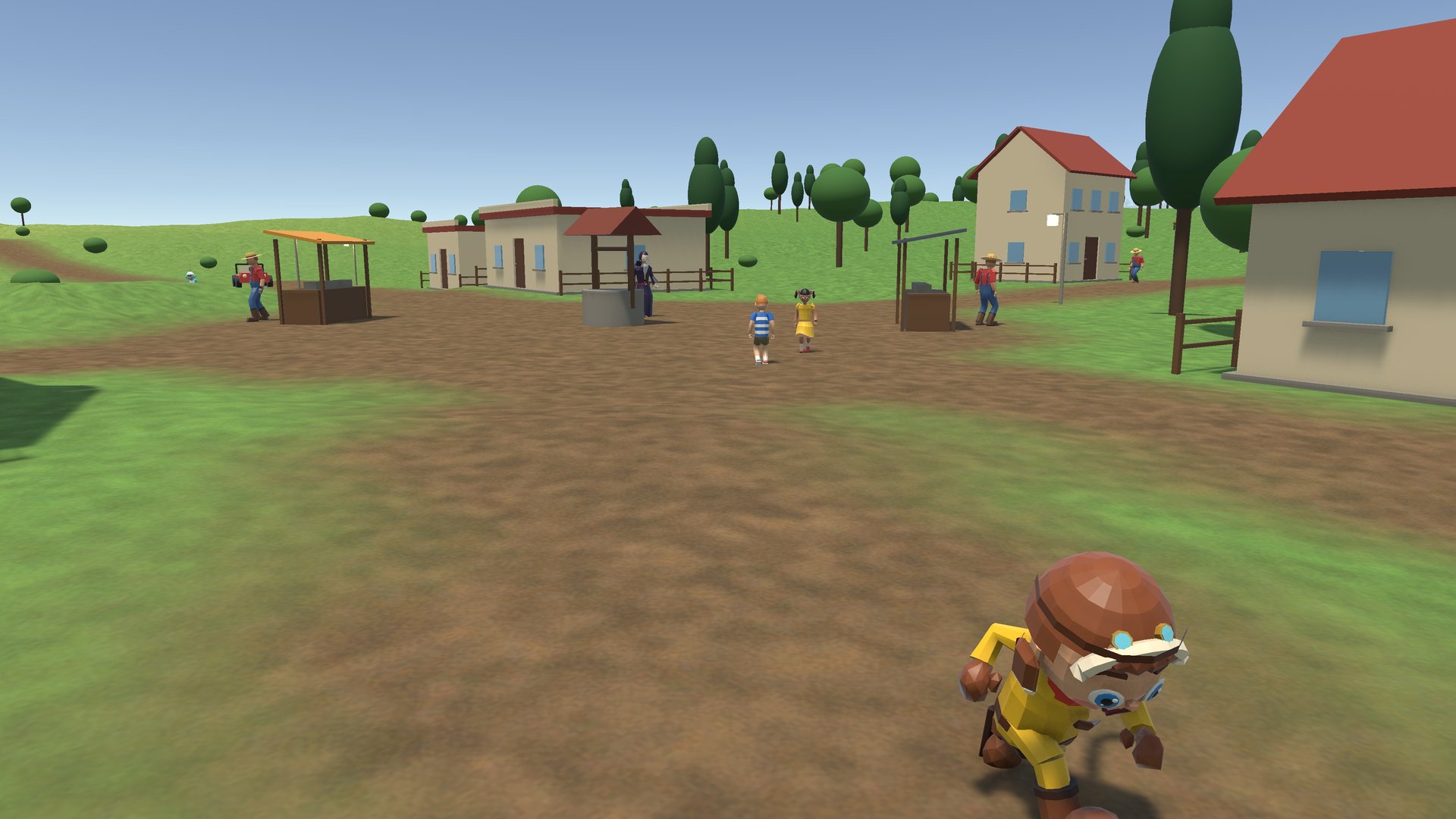
Thistlewick comes with NodeWorthyAI as a Sample. It is a small adventure on a valley 2.7 km across, and every part of it was made with the tools on this page. It has not one script of its own. Open any part and see how it was made.

The world

Nine Terrain tiles, streamed in and out as you go. Four towns joined by roads and bridges, two bandit camps, ruins, a shrine and a lookout, and deer and wolves by region.

The people

Wren, the hero, and a cast of cute characters, with an elder with a quest, a hunter, a fox, a robot with a buggy to lend, shopkeepers, goblin bandits, a warlord and skeletons.

The story

A main quest across the valley and two side quests, told in dialogue, ticked off by events, with rewards in the bag. Save at the shrine.

The events

Event graphs run the game. A Function pays the player, an If decides, a Loop wakes every bandit in a camp, and a Message raises the alarm.

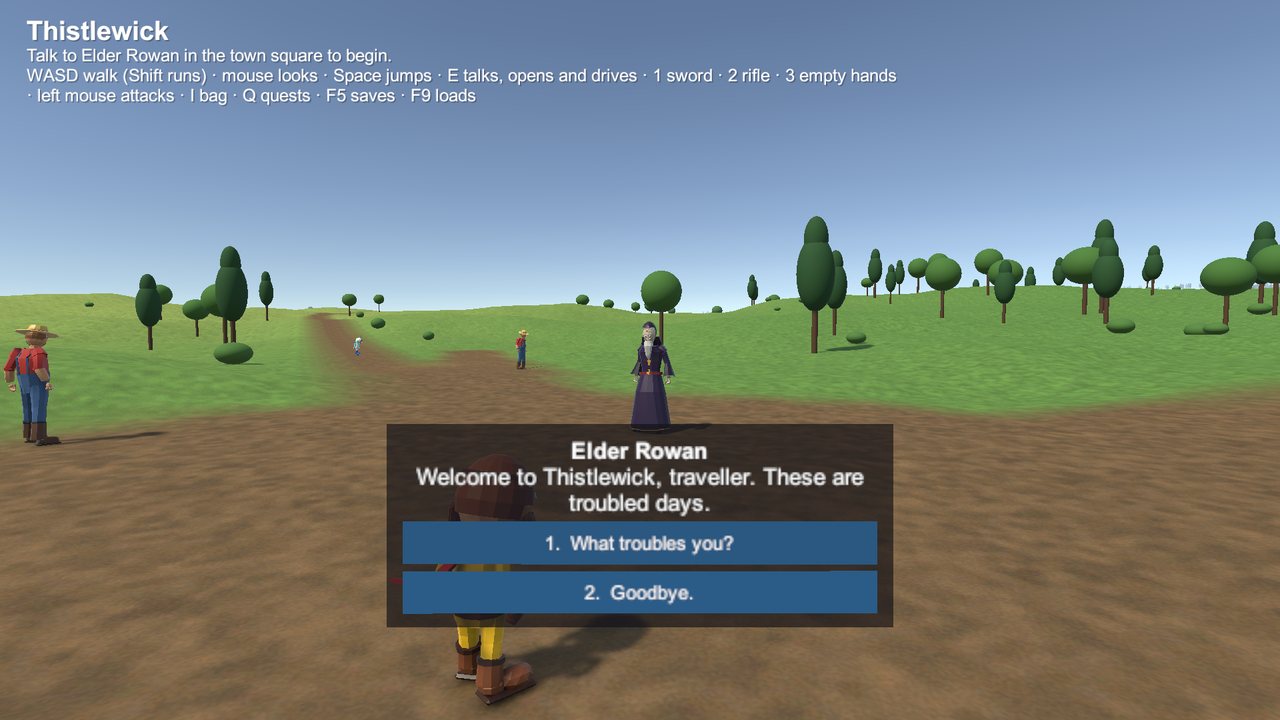
Wren talking to Elder Rowan in the town square
DialogueElder Rowan starts the main quest.
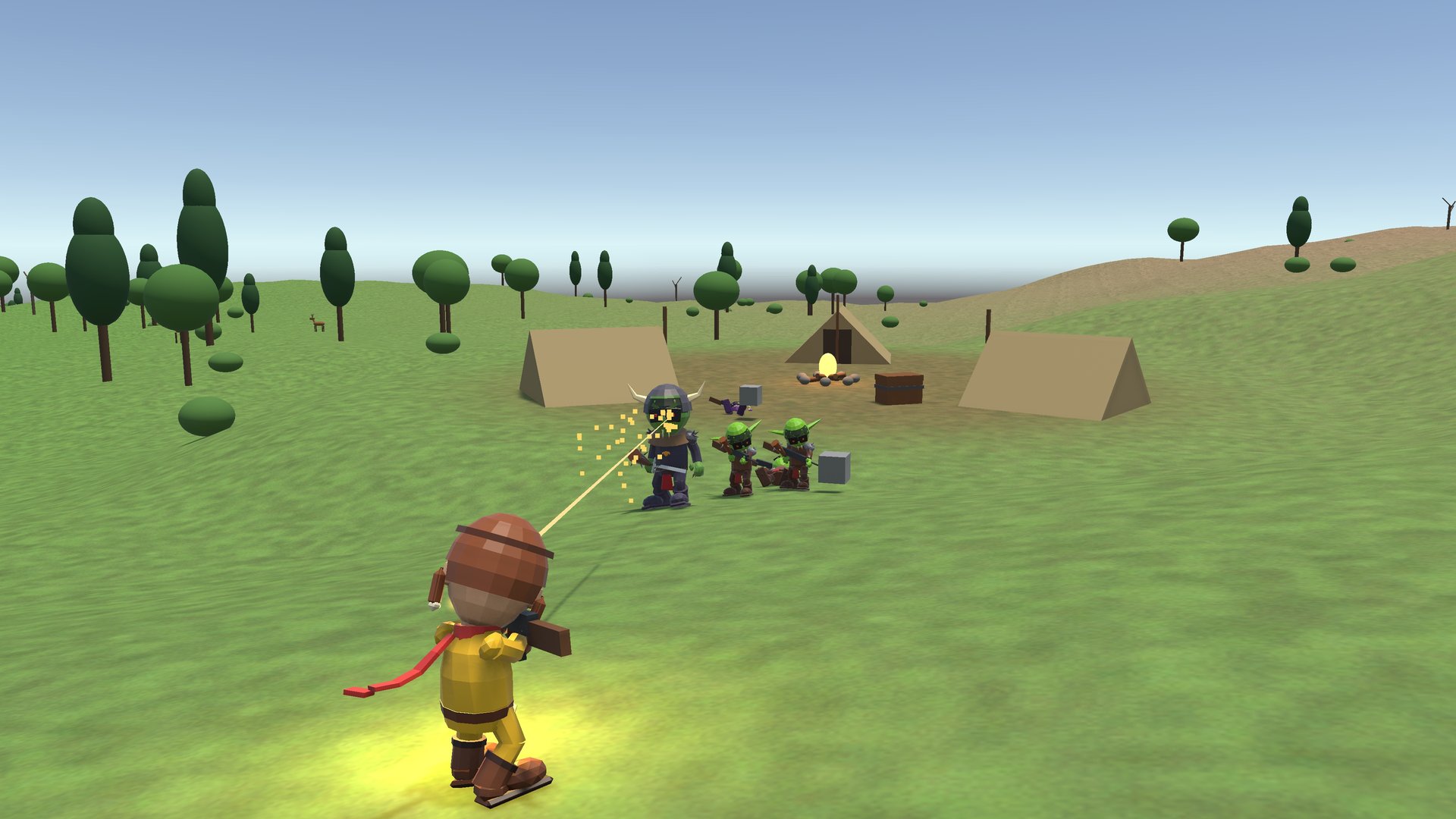
A bandit camp in Thistlewick
A bandit campPlaces to find, that quests can send you to.
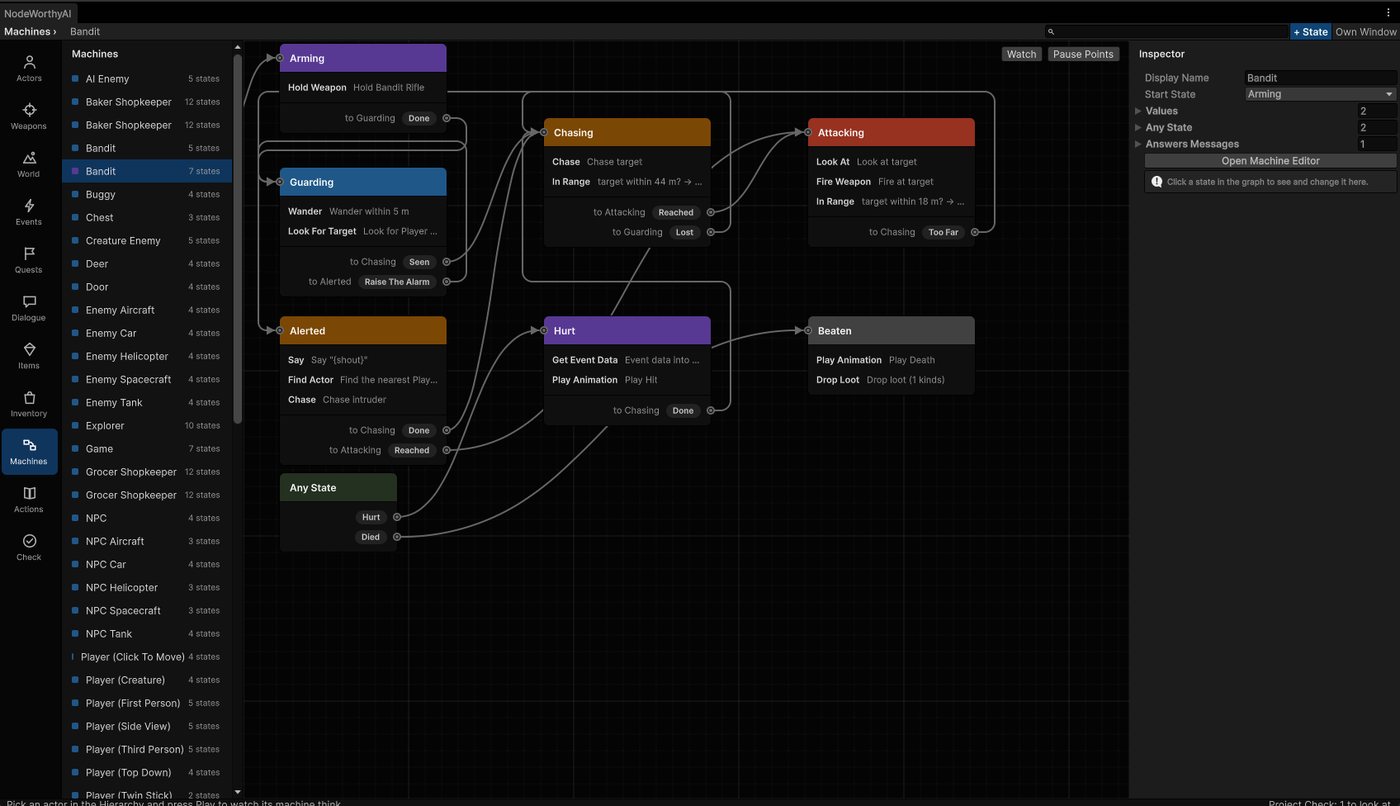
A goblin bandit's machine in the NodeWorthyAI window
A bandit's mindGuard, chase, give up, in a goblin's machine.

Actors

People and goblins, dogs and wolves, cars, tanks, helicopters, aircraft and spaceships are all actors, made in one go and ready to play.

  • Player, Enemy or NPC. A player in any of ten styles, such as third person, first person, over the shoulder, top down, side scroller, twin stick, click to move, isometric, 2.5D or on rails. An enemy that finds you, chases and fights. An NPC who wanders, talks when you press E, and runs when hurt.
  • Moves from any model. Its own clips first, then any in your project, then ours, each with a blend you can tune.
  • Weapons in hand. Guns, swords and launchers made in the Weapons section, held where you put the hands, fired by players and enemies alike.
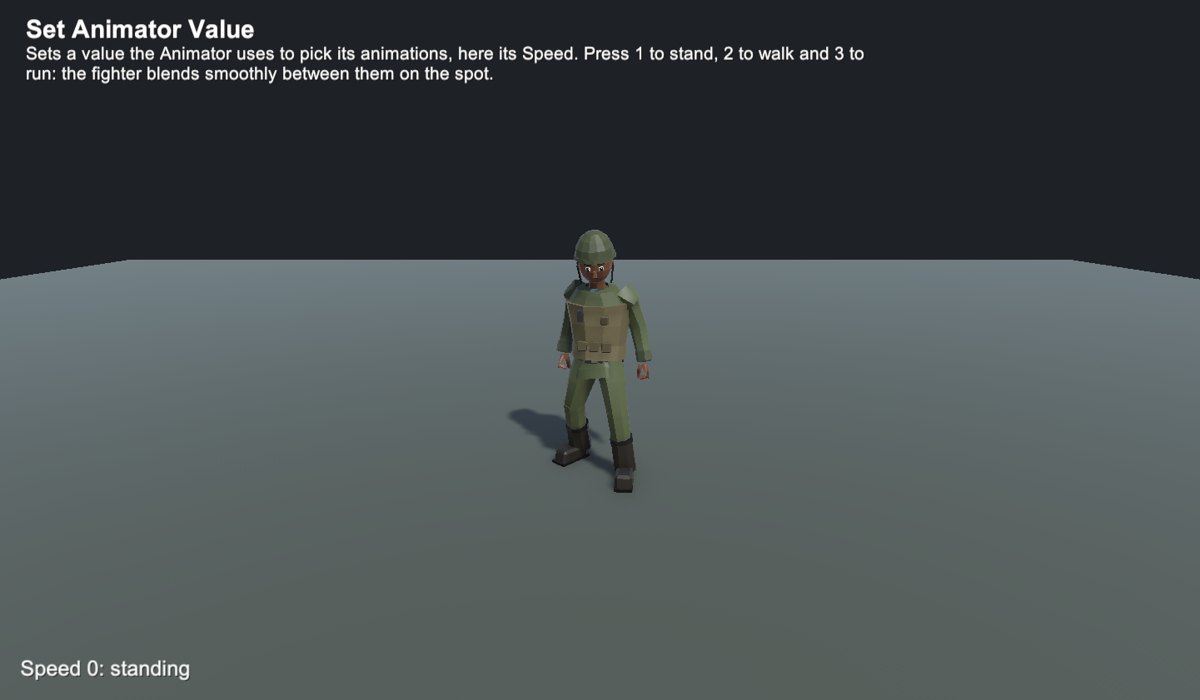
A soldier made with the Actor maker, blending between standing, walking and running
MovesAn actor blends smoothly between its moves as it speeds up and slows down.

Make a weapon, put it in a hand

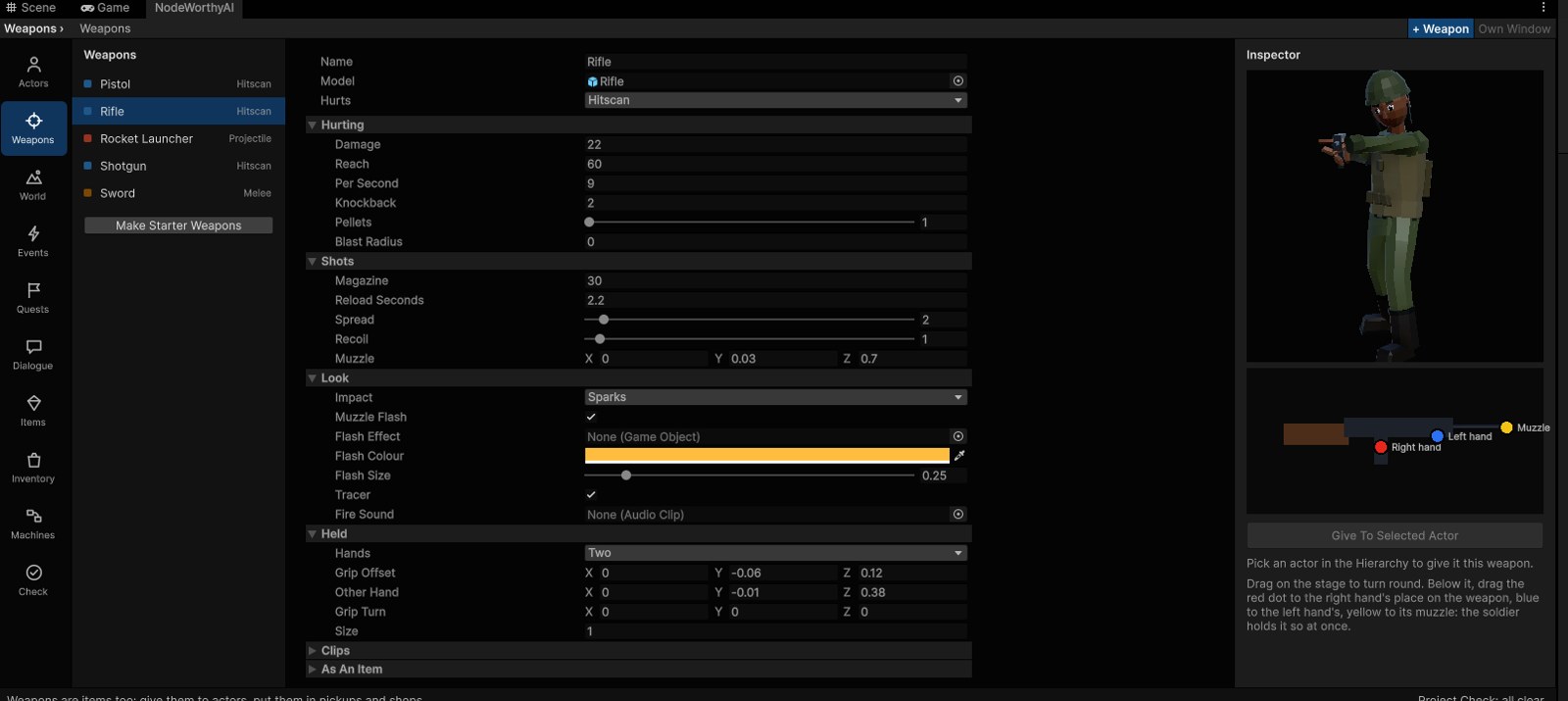
The Weapons section makes swords, pistols, rifles, shotguns and rocket launchers, and you see a soldier holding each one as you change it. Five starter weapons come ready to use or change.

The Weapons section: a rifle's settings in the middle, a soldier holding it on the right, and the dots that place the hands
WeaponsChange a setting and the soldier on the right holds it so at once. Drag the dots below him to place the hands and the muzzle.

How it hurts

A swing that lands in reach, a shot that hits at once along the aim, or something that flies and falls, such as a rocket, an arrow or a shell with a blast.

How it feels

Damage, reach, shots a second, magazine and reload, spread, recoil that kicks the view, knockback, pellets for a shotgun.

How it looks

Sparks, dust, blood or fire where it hits, a streak along each shot, a muzzle flash in your colour or your own effect, its own sound.

How it is held

Drag a red dot for the right hand, a blue one for the left and a yellow one for the muzzle. Rifle, pistol and sword poses keep the arms right as the legs run.

  • Weapons are items. They go in the bag, are equipped into the hand, sold in shops, dropped as loot and given as quest rewards.
  • Enemies use them too. An enemy holding a rifle stays at shooting range and fires short bursts; with a sword it closes in and swings.
  • Vehicles carry them. A tank's cannon turns with its turret, a fighter plane has its guns, and they hit what they are aimed at.
  • Five actions to hold, fire, reload and switch weapons and keep count of ammo, all in a machine with no code.

Open worlds, towns and roads

Islands, valleys, coasts, plains and mountains, as real Unity Terrains you can still sculpt and paint with Unity's own brushes.

  • In one go. Hills, rivers, lakes, beaches, paint, trees and grass, a flat place to start, and a NavMesh so everyone can walk it.
  • Open worlds. Many Terrain tiles that stream in and out as the player goes, so the world can be kilometres across. Regions from forest to snow, each with its own life. Deer and wolves appear round the player and go when they leave.
  • Roads and places. Towns sit on good ground, joined by roads that keep to gentle slopes and bridge the rivers. Bandit camps, ruins, shrines and lookouts wait to be found, and finding one is an event your quests can hear.
  • Towns that live. Roads, houses with doors that open, a market square, villagers who wander and talk, shopkeepers who sell for coins.
  • The same seed, the same world. Change a setting and the map redraws; press Another One for a new world from the same settings.
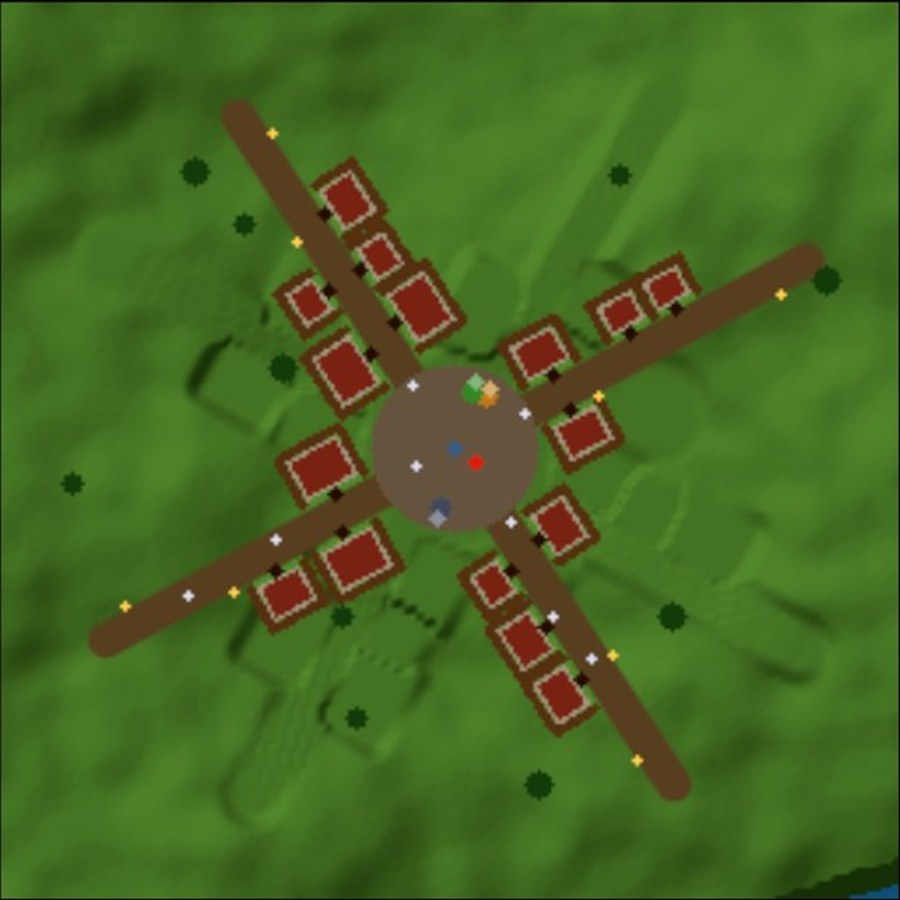
A town laid out at a crossroads, seen from above
TownsA crossroads town with houses on their plots, the square in the middle and lamps along the roads.

Machines

Each actor has a machine, with its states as cards and its ways out as arrows, states inside states and states side by side. While the game plays, the state it is in lights up, so you watch it decide.

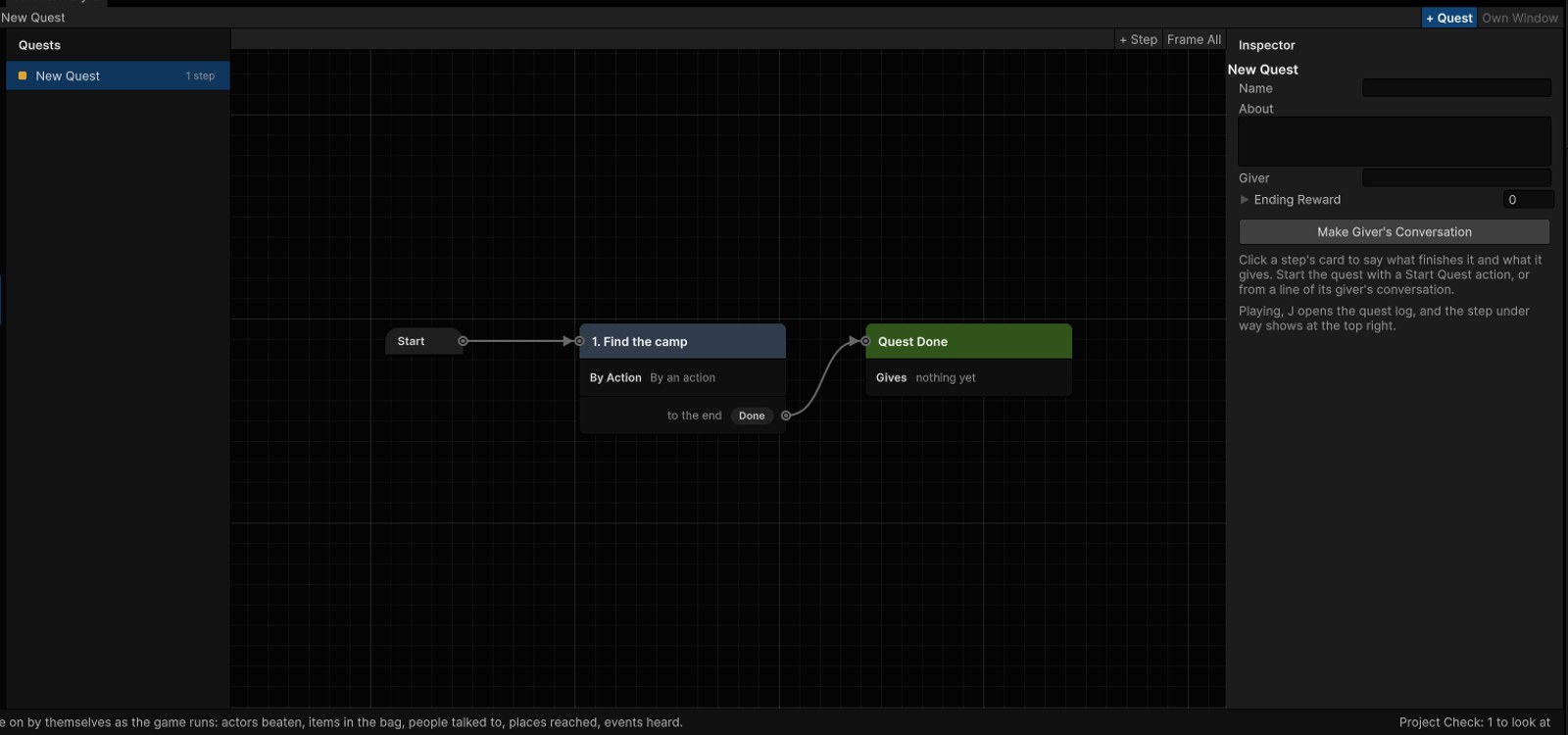
Steps as cards joined by arrows
Cards and arrowsMachines, quests and dialogue all look the same.
An actor's machine at work in play
In playIts machine says what it does next, here to find cover.

Event graphs

Machines say what a thing is doing over time. Event graphs say what happens when. Put one on any object, with an event box and then a chain of action boxes, read from left to right.

WHEN IT DIES ADD TO SCORE IF OPEN GATE SHOW TEXT yesno
  • The game starts. Once, as it begins.
  • It is clicked. The player clicks or taps a thing.
  • A key is pressed. A key, a mouse button or a pad button.
  • It is touched. Or stops being touched.
  • Every few seconds. Over and over.
  • Something comes near. One of a group comes within a distance.
  • A value changes. Such as the score.
  • It is hit, or it dies. A shot or a blow lands, or its health runs out.
  • A machine sends an event. Any machine, any enemy, or one thing by name.

The chain

Drag from a box's dot to add what it does next. Each box waits for the one before. Any of the 435 actions can go in it.

If and Loop

An If box has yes and no paths. A Loop box has an each time path, then carries on when done.

Functions

Select some boxes, right-click, and make them a function. Double-click a Call Function box to open it.

Comment boxes

Group boxes under a title and a colour. Drag the comment and they come along.

Watch it fire

In Play each event lights as it fires. Pause Here stops the game at an event.

Works with everything

Start a quest, give an item, or send an event for a machine to hear.

Functions, loops and finding faults

Every one of these works the same in a machine and in an event graph.

Functions

Build a list of actions once, give it inputs and outputs, and call it from any machine or event, such as "Deal Damage", "Open The Gate", "Pay The Player". Change it in one place and every caller changes.

If

Inside any state or event graph, if the player has the key, open the door, otherwise say it is locked.

Loops

Do it a number of times, for each item in a list, each child, each actor on a side, or while a check holds. The item and the count are there to use inside.

Messages

Shared kinds of event with named fields, such as "Hit" with amount and kind. Send one to a thing or to every thing that answers, and count how many did.

Local values

A function or a loop can have its own values, there only while it runs, so the machine's own values stay tidy.

Pause Points

Right-click a state or an event and pick Pause Here. When the game reaches it, Unity pauses, the graph opens there, and a line says why.

Step through it

Step one frame, run to the next state, or carry on. Pause only for the actor you picked, even when a hundred share one machine.

Watch

See the picked actor's state, the last event it heard and who sent it, and every value as it changes. Numbers draw a small line of the last few seconds.

Quests, dialogue and the bag

  • Quests whose steps finish by themselves, such as beat the wolves, bring three pelts, talk to the smith, reach the old tower. Rewards go straight into the bag.
  • Dialogue as cards, with lines and choices that give items, take them, start quests and send events. A choice shows only when it should, such as "has the key".
  • A bag to carry. I or Tab opens it to use, equip and drop things. A sword equipped goes into the hand; chests open beside the bag.
  • Actors say their own words. A hundred villagers can share one machine, and each still says what is theirs to say.
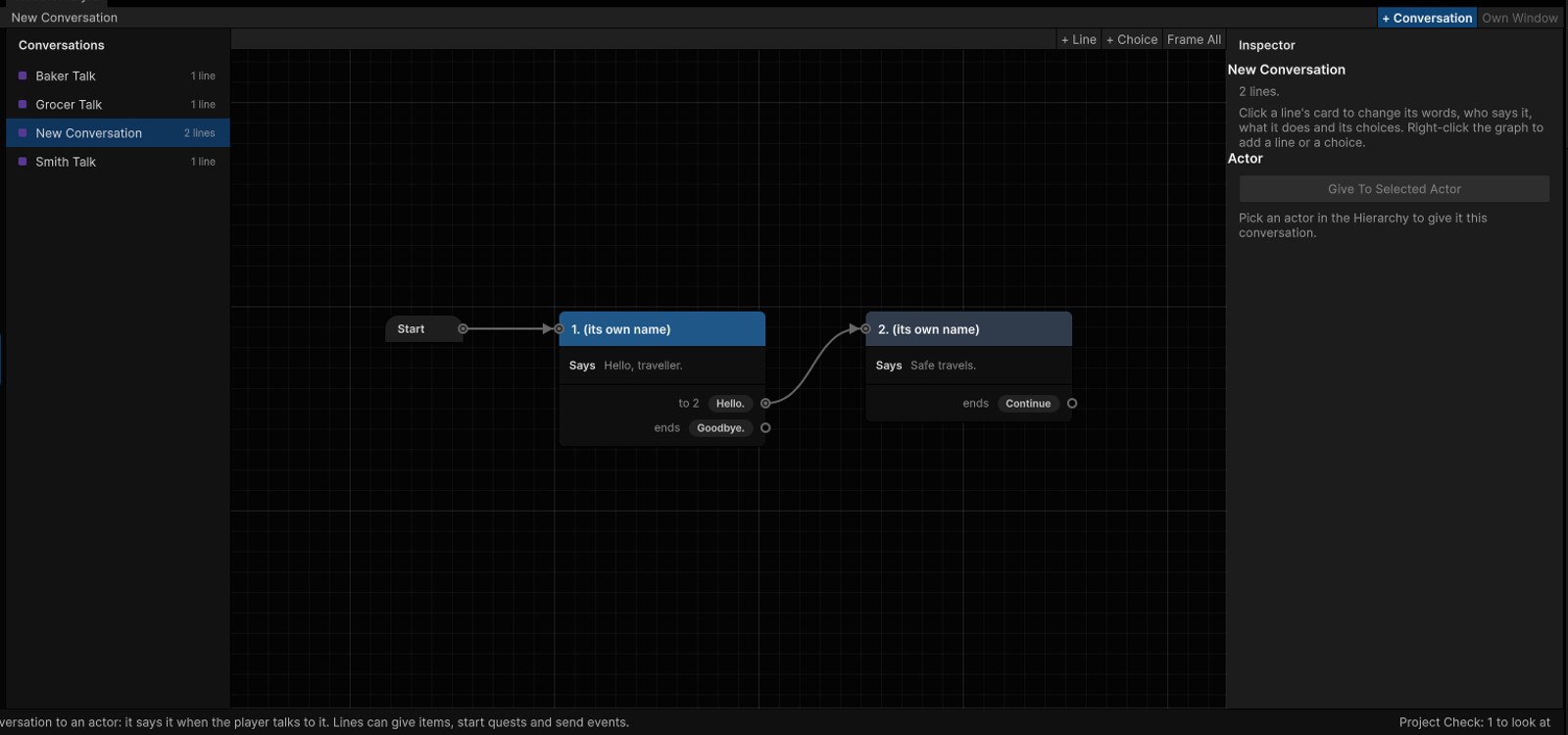
A conversation as cards, with choices leading to the lines that follow
DialogueEach line a card, each choice an arrow to what comes next.

435 ready actions, and a scene for each

Moving, jumping, crouching and swimming; fighting, shooting and taking cover; driving, flying and hovering; cameras, sound, screen effects, saving, quests, lists, data tables and more. Every action ships with a small example scene. Open it from the list, press Play and follow the words at the top.

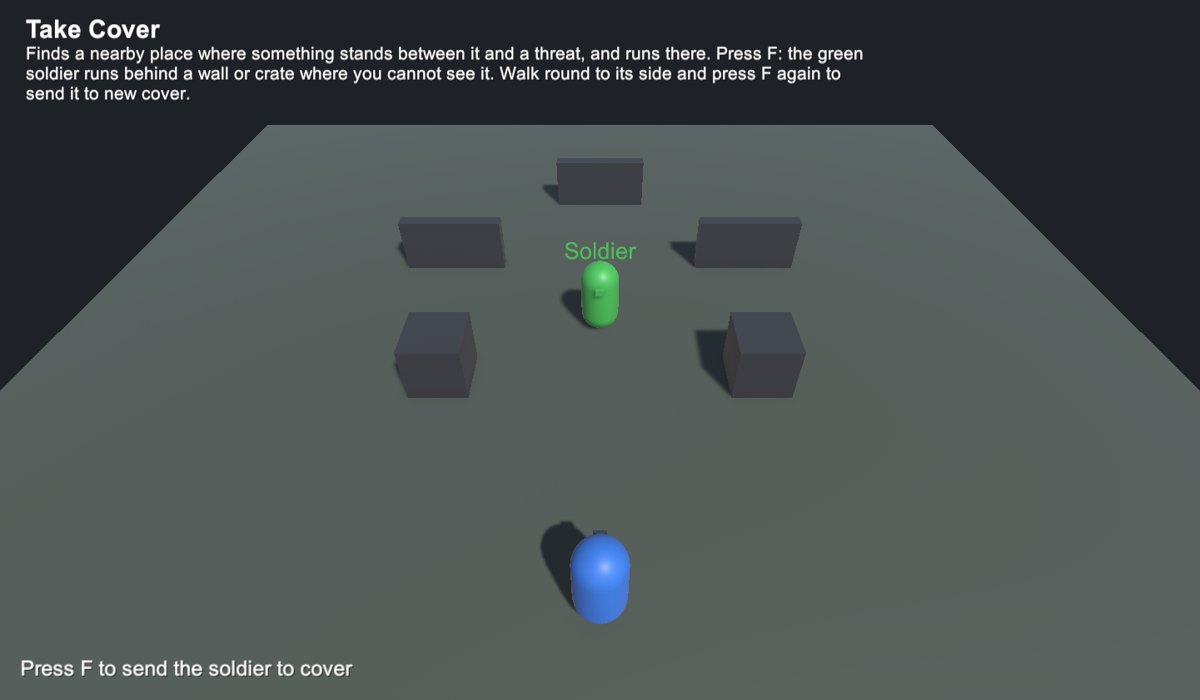
The Take Cover example
Take CoverA soldier runs behind a wall where you cannot see it.
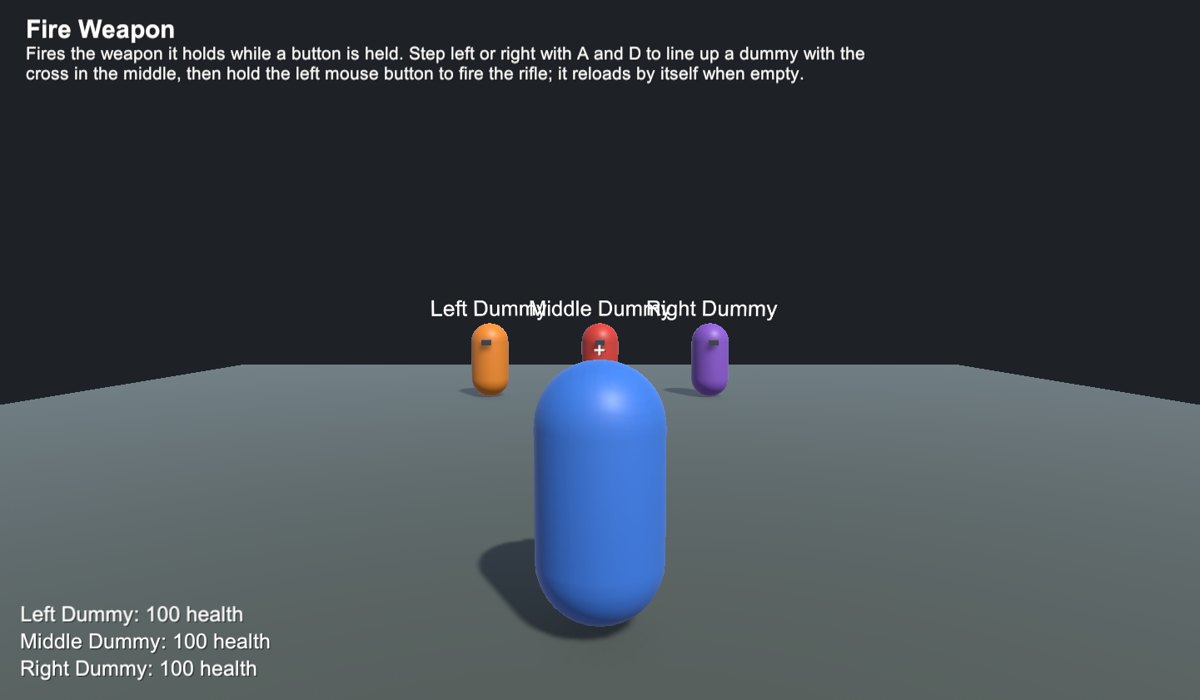
The Fire Weapon example
Fire WeaponLine up a target and hold the button.
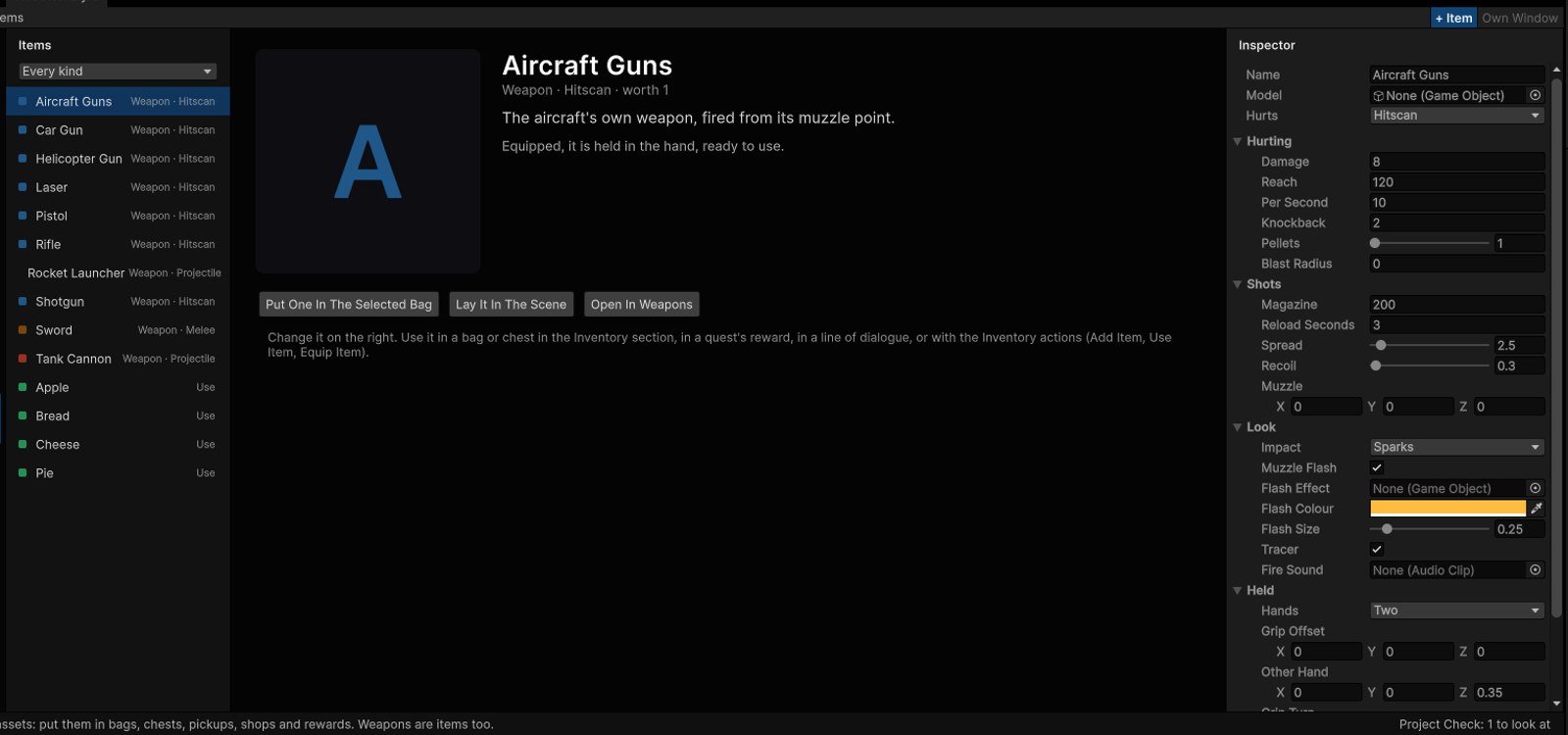
The Items section
ItemsWeapons, food, keys and coins are all items, all in the bag.

From no code to as much code as you like

You can stay on any one of these, or use several in the same game.

  1. Ready actions. Pick one and set its settings. There are 435 of them, each with an example scene.
  2. Machines. Draw how each actor, door or level behaves, with states as cards, arrows for what moves it on, and states inside states and side by side.
  3. Event graphs. On any object, when this happens, do these, one box after another.
  4. Functions, blocks and loops. Build a list of actions once and call it from anywhere; put If and loops inside any state or event graph.
  5. Sums in any setting. Type health / 2 + 10 into any number and it works it out as the game runs.
  6. Quests and dialogue that act. A line or a quest step can give items, start quests, set values and send events.
  7. Your own scripts, no glue code. A machine can call any public function of your scripts, or of Unity's, and read or set any property, picked from a list.
  8. Your scripts listen in. Machine Events turns any machine's events into ordinary UnityEvents in the Inspector, so your code answers them, and your code can send events back.
  9. Your own actions in C#. New Action writes the start of one for you; it shows up in the list with its own settings, like ours.

It works in the project you already have

Drop NodeWorthyAI into a project you have already started. It works alongside the code and the scenes you have, and changes nothing you did not ask it to.

Your project, left alone

No tags, no layers, no project settings changed. It writes only in its own folder.

Ordinary Unity

What it makes is plain Unity, such as Terrains, Animators, NavMeshes, uGUI, the Input System, prefabs. You can open and change any of it with Unity's own tools.

Undo

Every change, from a new actor to a whole world, is a step Undo takes back.

Light on the frame

Pools keep shots, effects and crowds smooth.

From a blank game to Play

  1. Open the NodeWorthyAI window. It works in your own Unity project.
  2. Put in your actors. Choose what each one is and a model, then whether the player drives it or the AI does.
  3. Build the world. Add terrain, water, towns and whatever stands in them.
  4. Say what happens. Use events and machines, picked from lists and set by clicking.
  5. Press Play. Your game runs in Unity, and Machines shows the state each thing is in.
  6. Build it. Everything made is ordinary Unity, so you build your game the Unity way.

Every part of a game, in one window.

Actors

People, creatures, cars, tanks, helicopters, aircraft, spacecraft, boats and hoverbikes, each as Player or AI.

Weapons

Make a weapon, put it in a hand, or mount it on anything that is not a person.

Platform

Tile blocks, a hero, ready things and your own art, for side-on games.

Art Book

Put your own against anything of ours your game uses, once.

World

Unity Terrains, open worlds, towns and the things that stand in them.

Environment

Sky, sun, time of day, fog and the look of the screen.

Water

Seas and ponds that float boats, make foam round everything and leave wakes.

Events

Draw what happens as an event graph on any object.

Quests

Steps to finish, and what the player gets for them.

Dialogue

Conversations for actors.

Items

Every item, weapons too, to find, carry, use and sell.

Inventory

Bags actors carry, and chests to open.

UI

What players see, such as the Escape screen, the title and what stays on screen.

Machines

States and arrows you can see, lit up as the game plays.

Actions

Every action, what it does, and an example to play.

Check

Reads your game and says what to look at.

Jim, Stuart and Janice

All three are in the app. Each does one job and leaves the rest alone. They run on your own computer, with no account and no internet, and your game stays with you.

Jim

Builds worlds with islands, valleys, rivers, forests and towns. Ask for 16 buildings and 16 stand. Short edits change only what you name.

Stuart

Makes machines and event graphs. Ask for a door that opens on E, or a zombie that comes after you, and he builds it from the same actions you use, as one step Undo takes back.

Janice

Writes dialogue and story, including conversations, quests and the items in them. Then edit it in a few words, such as make the reward 100 gold or rename the quest.

Questions

Can I get it now?

Not yet. We are finishing it, and it is coming to the Unity Asset Store. Sign up below to hear first.

Do I need to write code?

No. Machines and event graphs need no code at all. If you want to write code, New Action writes the start of your own action in C#.

Which Unity do I need?

Unity 6.6 or newer, with URP. It goes into your own project, and adds no tags or layers and changes no project settings.

2D or 3D?

Both. New 2D Scene makes a 2D game, seen from the side or from above.

Can I use my own models?

Yes. Use any model in your project. What comes with the package is there to start you off.

Does the AI need the internet?

No. The helpers run on your own computer.

Hear when it comes out

We will email you about the launch date and the first videos, and not much else. Questions? Write to .